Planning a transition
A mix from track A into track B works when the beats line up, the keys agree, and the two tracks do not fight over the same space. Euphoria checks all three for a pair of tracks and suggests where to do it.
euphoria plan playing.flac next.flacThe command reference lists the output and the JSON.
Lining up the beats
B is stretched to the tempo of A, with its pitch kept, and laid on the bars of A so that each downbeat of B falls on a downbeat of A. A deck plays a track between half and twice its speed, so a pair whose tempos need more than that has no plan, and the command says so. Euphoria reads the grids it already detected for both tracks, so a wrong grid gives a wrong alignment. Check it first if a plan sounds off.
Reading a track bar by bar
For each bar of each track the plan holds:
- Section: Start, Main, Breakdown, Drop or Outro, from the cues placed by analysis, or Section for a track whose cues are numbered sections because its level does not rise and fall like a DJ arrangement.
- Energy: the energy rating of the bar, from 1 to 10.
- Vocals, bass and drums: whether each sounds, read from the stems.
A stem sounds in a bar when its level is at least a quarter, 12 dB below, of that stem’s own body level, and above 40 dB under full scale. The body level is the level that 90% of the stem’s bars with sound stay at or below, so a few loud bars do not raise it and a track with a quiet voice is judged by its own voice, not by the drums. The floor keeps the little of other instruments that separation leaves in every stem from counting as a voice.
Without cached stems the three are shown as unknown. Euphoria does not guess them from the mix. Separate the track first with euphoria stems.
Clashes
Laid on top of each other, each bar of the window is one of four things: both tracks sing, both play bass, neither (clear), or unknown because a stem is missing. Two voices at once is the worse of the two clashes, since nothing repairs it, while two basslines can be separated by cutting the low end of one.
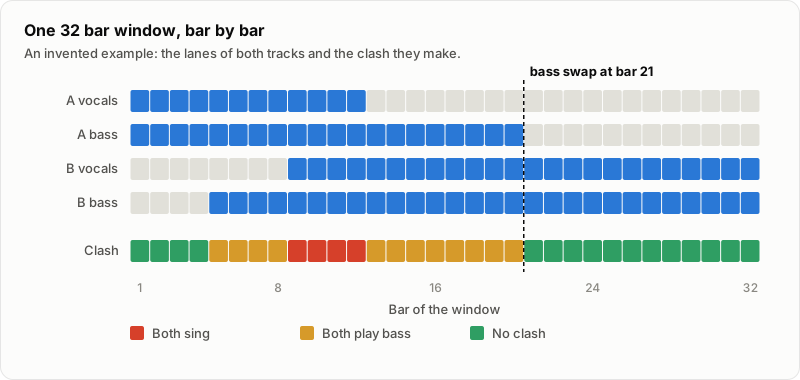
An invented example of one window. The bass swap is the first bar from which the two never play bass together again.
Choosing a window
A window is 16, 32 or 64 bars. It starts on a phrase boundary of A, every 8 bars for a window of 16 and every 16 for the longer ones, in a section of A that is not its start, and at the start of a section of B that is not its outro. Each is scored from 0 to 100:
| Part | Weight | What it measures |
|---|---|---|
| Clashes | 0.45 | A bar of both voices costs 2, a bar of both basses 1. The part is zero when the cost reaches a quarter of the bars checked. |
| Energy | 0.20 | How close the energy of A over the window is to the energy of B in the 8 bars after it. |
| Key | 0.20 | 1 for the same key, adjacent or relative; 0.8 for diagonal, 0.7 for an energy boost, 0.5 for a mood change or a semitone boost; 0 for a clash of keys. |
| Room | 0.15 | 1 when A lasts through the window. A window that outlasts A also has its score halved. |
A part that cannot be measured, such as the energy of a track without a curve, is left out and the others share its weight. Bars whose clash was not checked, because a stem is missing, are not left out: they earn no clash credit, so a plan without stems scores at most 55 of 100, ranks on energy, key and room alone, and says “stems missing, clashes not checked”. A window with unchecked bars never ranks above one whose bars were all checked, and the command marks it (N of M bars not checked). Clashes weigh most because they are what a listener notices first; vocals weigh double because a bass clash can be fixed with an EQ and a vocal clash cannot.
Each window comes with its steps: start B, swap the bass at a bar, bring in B’s vocals at a bar, and A ends. The first cues for the best window are suggested for both tracks and are not written anywhere until you set them.
In the app
The focus view of the desktop app makes the same plan for the selected track and each track it mixes into. The Vocals and bass overlap column of its Mixes into list shows the clash strip of the best window and a verdict, Clean, Vocals overlap, Bass overlap or Stems needed, the Transition tab puts the best window in a sentence, and the planner lets you audition B after B: a list of the tracks that fit after A, ranked like the Next after list, where one click makes a track B, picks its best window and plays the transition into it. B can be dragged along the timeline to move the mix point, and markers jump between the suggested windows. The grid of bars shows both tracks with the lanes and the clash row, and the planner plays the transition: A, then B in on the planned bar at the plan’s tempo, with an equal-power crossfade over the window. It can also separate the stems of either track on the spot, which fills the lanes and the overlap row in without leaving it.
Two things differ from the command. The app reads the sections from the cues the track shows, so a cue you dragged or renamed moves the windows, where the command reads the automatic cues. And it never separates stems by itself: a pair without stems reads Stems needed, and the card and the planner offer a button that starts the separation. Setting the cues from a window writes Mix out, Mix out end, Mix in, Bass swap and Vocals in as your own cues, which one undo takes back on both tracks.
Limits
- The weights are chosen by reasoning about what a DJ hears, and have not been tuned against DJs’ own choices.
- The sections come from automatic cue detection, which is a guess too. A wrong section moves the windows.
- Stems come from a separation model, which leaves bleed and drops quiet parts. The thresholds above are chosen by hand and not yet measured against ground truth.
- Only 4/4 music on a constant grid is planned. A tempo change inside a track is not followed.
- The tempo of B is matched to A as detected. Half or double time is not tried.
- Energy is read from a curve of 8 second windows, so a bar’s energy is the energy around it.