Render a set as one mix
euphoria set render plays a set from its first track to its last into one audio file, as a DJ would mix it: each track comes in on the beat of the one playing, at the tempo of the one playing, and takes over at a section start. You get a WAV, FLAC or MP3 file, and if you ask for them, a CUE sheet, a tracklist and chapter lines for a video description. Your tracks are only read, never changed.
euphoria set render "Friday" --out friday.wav --cue --tracklist --chaptersWhat a set is
The set is the tracks in play order, given one of three ways:
- the name of a playlist built in the desktop app, such as
"Friday", the order of the set builder once you save it as a playlist; - an M3U or M3U8 playlist file, from
euphoria set build --m3uor from another program; a relative path in it is read from the playlist’s folder; - audio files, in the order you list them.
A folder has no play order, so it is refused. Tracks are analyzed first, or read from the cache, with your corrections applied.
Where each track comes in
For each track and the next, Euphoria plans the transition as euphoria plan does (the concept page explains how) and takes the best window it ranks. The outgoing track leaves on the start of one of its 8 or 16 bar phrases, and the incoming one comes in at the start of one of its detected sections, never at a fixed count of bars from the end. A blend lasts 16, 32 or 64 bars, as the plan chose.
A window has to start after the blend into the outgoing track has finished, so no more than two tracks ever play at once. When the best window starts too early, the next best that fits is taken.
The plan is printed before anything is rendered, one line per track with the time it starts in the mix, and under it why the transition is placed where it is:
Friday  3 tracks, 14:52

1.     0:00  Artist - First track
             ↳ Outro (bar 97) into Start (bar 1), 32 bars: no vocal overlap, bass swap at bar 17, key: adjacent
2.     5:12  Artist - Second track
             ↳ Main (bar 81) into Breakdown (bar 17), 16 bars: stems missing, clashes not checked, key: same key
3.     9:40  Artist - Third track
The words after the colon are the planner’s: whether the vocals or the basslines overlap, where the bass is swapped, and how the keys relate. Vocals and bass are only checked for tracks whose stems are already separated with euphoria stems or in the app; set render never separates a track itself.
--dry-run prints the plan and stops, so you can check the transitions before a long render.
Transitions you placed by hand
In the desktop app’s transition planner, dragging B to a new mix point, or pressing the marker of another window, locks that transition. set render, in the app and on the command line, keeps a locked transition exactly where you put it and never plans it again; its line in the plan starts with “Locked, placed by hand.”. The transitions around it are planned to fit: the one before ends before it starts. Unlock in the planner gives a transition back to the plan.
When both tracks sing at once
Two voices over each other make both hard to follow, so set render warns about every blend where both tracks sing in the same bars, under its line in the plan:
2.     5:12  Artist - Second track
             ↳ Main (bar 81) into Breakdown (bar 17), 16 bars: 6 bars of both vocals, bass swap at bar 9, key: same key
               ! Both tracks sing for 6 bars, from bar 11 of the blend
               Fixes, for --fix-vocals: move (move the blend to bar 97 into bar 1), cut (cut the outgoing vocals with its stems), fade (swap the bass early and fade out by bar 11)
Vocals are only known for tracks whose stems are separated, so a blend is only checked when both tracks have them. Three fixes are offered, each only when it applies:
- move: blend over another window the planner ranks, one where only one track sings and that fits between the blends around it. A transition you locked by hand is never moved this way.
- cut: play the outgoing track from its drums, bass and other stems from the start of the blend, so its vocals are gone (switched over half a second just before). It needs the outgoing track’s stems, at the track’s sample rate.
- fade: swap the bass early and fade the outgoing track out completely before the bar where both would sing, with the incoming track at full level by half way there. It needs at least 2 bars before that bar.
--fix-vocals applies the first fix that applies to every such blend, in the order above; --fix-vocals move, cut or fade applies that one wherever it applies. The fixed line then says which. Without the option the plan only warns, so run --dry-run first to see them.
In the desktop app, Check transitions, under Show details in the set builder, lists every transition of the set with its reason, and under a blend where both sing, the warning and a button per fix. Moving locks the transition at the new window, as a drag in the planner does; cutting and fading hold for the renders of the set while the app runs. Render mix… uses them.
Sections you edited
The sections are read from the cues each track shows, so cues you moved or named by hand in the app count, as they do in the planner.
When two tracks cannot blend
A pair plays one after the other, the next track from its start once the one before has ended, when:
- either track has no beat grid,
- the next track would have to play at less than half or more than twice its speed to match,
- no window of 16 bars or more fits the two tracks, or every window starts before the blend into the outgoing track ends.
Its line in the plan says which, for example “Played one after the other: the incoming track has no beat grid”.
How a blend sounds
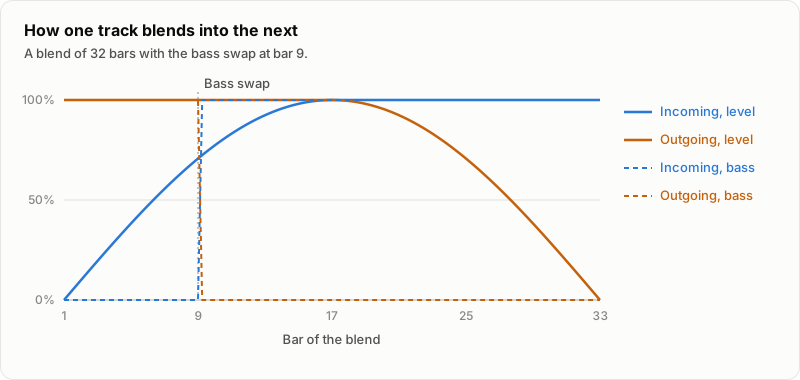
- Tempo. The incoming track is time-stretched to the tempo of the one playing with Signalsmith Stretch, the stretcher of the decks, so its key does not move, and lies on the same downbeats. Once the outgoing track has ended, the incoming one glides back to its own tempo over 16 seconds while it plays alone, or over the time it plays alone when that is shorter. Over a whole set the tempo follows each track’s own, not the first one’s.
- Level. The incoming track rises over the first half of the blend, and the outgoing one falls over the second half, both on equal-power curves, so the sound stays even.
- Bass. Below 180 Hz, the incoming track is silent until the bass swap, where its bass comes in and the outgoing bass goes out within one beat, so the two basslines never play over each other. The swap is at the bar the planner found where the incoming bass can come in and stay with no clash, or in the middle of the blend when it found none.
- Peaks. Where two tracks add up above 1 dB below full scale, a limiter that looks 5 milliseconds ahead turns the mix down smoothly and lets go over 150 milliseconds. Elsewhere the sound passes as it is: a track that plays at its own speed and at the sample rate of the mix is not stretched at all.
The files
| Option | Writes |
|---|---|
--out FILE |
The mix: 24 bit stereo WAV for a name ending in .wav, 24 bit FLAC for .flac, MP3 for .mp3. A WAV over 4 GB is written as RF64, the extended WAV most editors read, so a set has no length limit. |
--cue |
NAME.cue beside the mix: a CUE sheet with one track per track of the set, its title and artist and the time it starts. Players and burning programs use it to skip between tracks of one file. |
--tracklist |
NAME.tracklist.txt: the name of the set, then one numbered line per track with the time it starts, such as 03. 9:40 Artist - Title, and the length of the mix. |
--chapters |
NAME.chapters.txt: one line per track, such as 9:40 Artist - Title, starting at 0:00, the form a video description turns into chapters. |
A track starts, in all three, where it is first heard: the start of the blend into it.
The sample rate of the mix is the one most tracks have, and the first track’s on a tie. A track at another rate is converted as it is stretched. An MP3 mix is constant bitrate, 320 kbps unless --mp3-bitrate gives 96, 112, 128, 160, 192, 224 or 256, encoded by LAME, which is built into Euphoria, so nothing has to be installed. Its ID3 tag holds the name of the file as its title and a chapter per track, with the track’s name and where it starts and ends, which podcast apps and some players show as chapters. MP3 is lossy: keep the WAV or FLAC if you will edit the mix further.
The mix is written under a temporary name next to --out and moved into place once it is complete, so a failed render leaves no half file. An existing mix, CUE sheet, tracklist or chapters file is refused before anything is rendered, unless you pass --force.
In the desktop app
Render mix… in the set builder renders the set on the page, as MP3 when the name you give ends in .mp3, with a progress bar and Cancel, and writes the CUE sheet, tracklist and chapters beside the mix every time. See Build a set.
How long it takes
Rendering runs on one core. A track that needs no stretching is copied through; a stretched one goes through Signalsmith Stretch, faster than real time by a wide margin. A progress bar on the terminal shows how far it has got and the time left.
Limits
- The command line has no way to move one transition; lock it in the desktop app’s planner, and the command line keeps it.
- Cutting the vocals relies on the separation: some vocal bleed into the other stems stays audible.
- Tracks whose tempos are an octave apart, such as 70 into 140, are played one after the other.
- Not tested: listening to a whole rendered set from a real library, and RF64 files over 4 GB written end to end (the header is tested on its own).